The price is based on instinct rather than the file
An order priced too tightly consumes the margin on the next one – continuously and unnoticed.
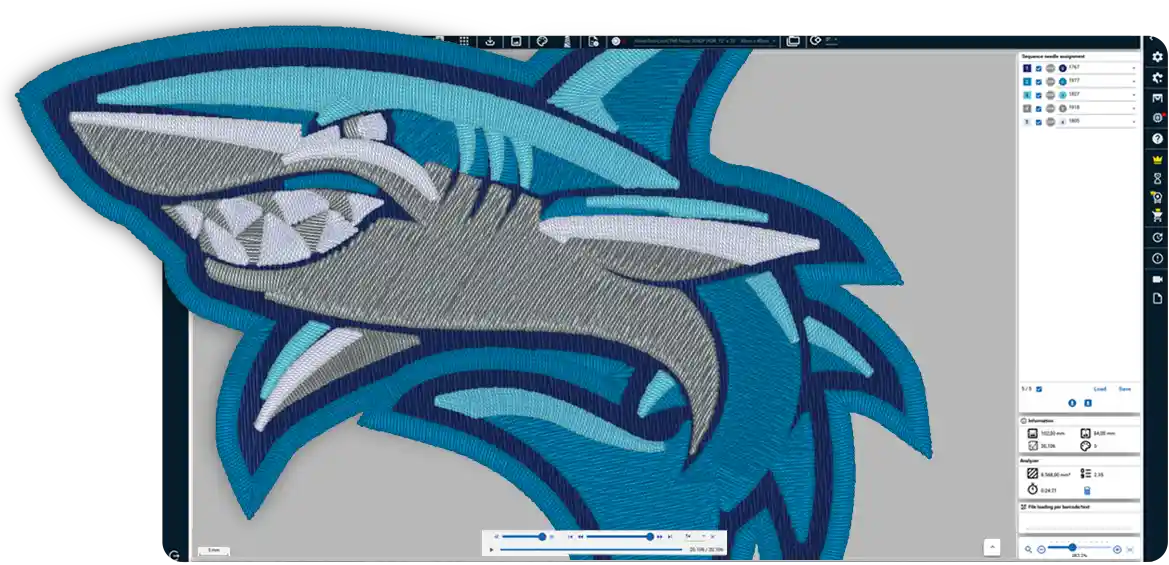
ZSK TERMINAL prepares existing embroidery files for your ZSK embroidery machines. Depending on the edition, it also provides hoop checking, colour matching, job costing and production planning.
TERMINAL works with ready-made embroidery files – your own or supplied by customers – prepares them and transfers them to the machine.
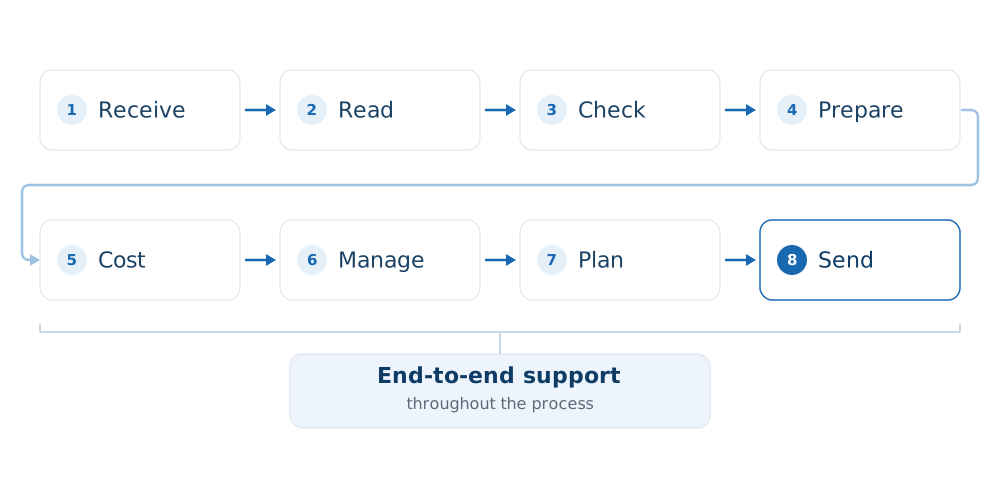
Every order follows the same process: it arrives, is read and checked, prepared and costed, managed, planned and sent to the machine. TERMINAL supports it throughout this process.
TERMINAL is not digitising software and cannot be used to digitise designs; EPCwin and BasePac are available for this purpose.
The exceptions are lettering and photographic motifs, which TERMINAL can generate itself.
Your margin is determined not only by embroidery time, but also by everything that happens before and around it. These are the three areas where costs most often arise in practice.
An order priced too tightly consumes the margin on the next one – continuously and unnoticed.
In practice, this often means 20 to 40 minutes of downtime per incident, plus rescheduling.
A production error costs more than time: it also puts material and the delivery date at risk.
The steps do not disappear; they move into the software. What matters is how many of them a person still has to perform manually.
The order arrives and is entered in a list.
5 minsThe customer file is in a format that requires a separate tool.
5 minsWhether the design fits the hoop only becomes clear during set-up.
10 minsThe price is based on experience.
10 minsThe file is taken to the machine on a USB drive.
5 minsColours and needles are entered at the control.
8 minsThe status of an order has to be checked by asking someone.
5 minsOpen the file in the project.
2 minsSend the checked design to the machine.
3 minsSix steps that no longer require manual intervention – and where nothing can be lost in the handover.
The machine does not embroider any faster. This is working time that was previously lost between process steps.
Times are practical estimates, not guaranteed performance figures. Actual results depend on the order mix, file formats and machine fleet.
From the Free edition, TERMINAL reads common formats and sends designs to the machine. Studio adds the remaining formats, batch processing, hoop checking and job costing; Factory adds projects and the planning overview. The module table below shows which functions are included in each edition.
Calculate the job directly from the finished embroidery file using your own rates.
See on screen whether the design fits the hoop and which thread cone carries each colour.
The schedule, production queue and maintenance records are available to the whole team, not just the person who created them.
The software comes from the manufacturer of your machine – and our specialists understand both.
Your ZSK embroidery machine keeps getting better
The T8 control software is continually being developed. Free updates add new functions and improvements to your ZSK embroidery machines.
Your business benefits through new product opportunities, more efficient workflows, higher embroidery speeds, stronger margins and greater profitability.
In future, T8 software updates will be displayed exclusively in TERMINAL and can be accessed there. The Free edition is all you need: register once and you will be notified of every enhancement without having to search for it.
A customer sends a file in a format you cannot open. You estimate whether the design will fit the hoop, assign the thread cones one by one and price the job from experience. Any problem may only become apparent at the machine.
With TERMINAL Studio, you can open the file, check the design in the hoop, match its colours to your thread cones automatically and produce a PDF quotation – all before the machine is set up.
Simply register once. The free feature set lets you supply one ZSK embroidery machine with designs at no additional cost.
For preparing embroidery designs – and for businesses that need reliable, transparent job costing.
Included in Free
TC/Z00 DST DSZ PES TBF PAT
From Studio – 43 formats in total, including
EXP JEF PEC PCS VP3 HUS U01 SEW XXX TAP DSB EMD GT
Looking for a format that is not listed here? Ask us about it: software@zsk.de
A customer asks about an order. A machine breaks down. A second workstation needs access, or maintenance work must be documented. At moments like these, your team needs to know exactly what is running and whether a promised delivery date is realistic.
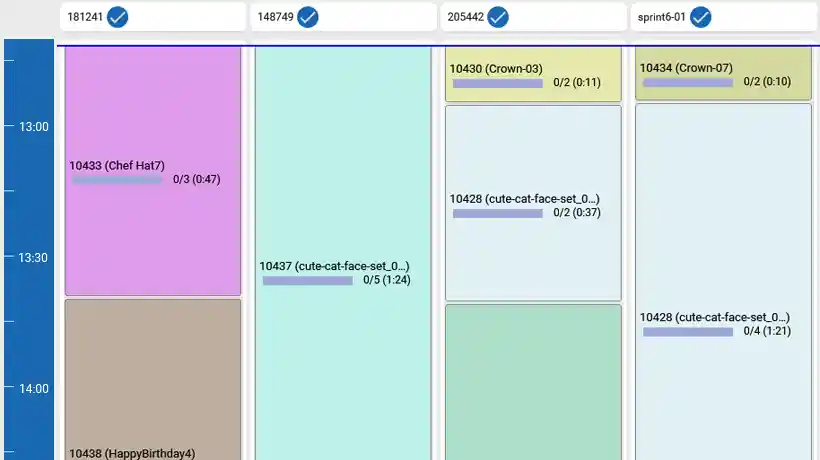
With TERMINAL Factory and the ZSK PoolBox, the schedule is available on every screen, each machine reports its progress and maintenance records include named sign-offs. The deciding factor is not the number of machines, but whether anyone else needs a clear view of current production.
Production planning across the machine fleet, a queue for each machine, signed maintenance records, projects containing every order file and one shared status across all workstations.
The edition for technical embroidery. Its current module set is identical to Factory; functions for technical applications will be added to this edition in future releases.

TERMINAL also works without a network, using a USB drive or an output folder. ZSK AirBroidery lets you send and manage embroidery files wirelessly at the machine. ZSK PoolBox connects multiple machines to TERMINAL and, with the appropriate module, provides live production feedback.
PoolBox comes into play as soon as more than one workstation is involved or the planning overview needs to be displayed on screens in the production area.
Planning for five active machines is included. Two add-on packages extend ProductionPlanner beyond that.
Only you know the answers. A short conversation is enough for us to identify the edition that best suits your business.
These products complement one another by function rather than by sequence. What you need depends on what you want to achieve.
Receive, check, prepare and cost files, then send them to the machine. The Free edition remains available permanently.
ZSK AirBroidery lets you send and manage embroidery files wirelessly at the machine. ZSK PoolBox connects multiple machines to TERMINAL and, with PoolBoxConnect, provides live production feedback.
Each edition builds on the one below and includes all of its features. All prices are shown here; paid editions can be cancelled monthly and tried for 30 days. The table below shows which modules are included.
free
For every ZSK embroidery machine: manage designs, send them to the machine and receive the latest T8 updates.
Free to use permanently
Download Free€49 / month
Know before set-up whether the design fits the hoop, whether the thread colours match and what the embroidery job will cost.
€129 / month
See which order is running on each machine and which machine will become available next.
€199 / month
For technical embroidery applications – TFP, smart textiles and composites.
Larger machine fleet? Add-on packages extend your planning capacity: ProductionPlanner Pro supports up to 20 machines for €500 per month, while Enterprise supports up to 50 machines for €1,000 per month.
The edition shown is the first to include the module.
| Module | From edition | What it does |
|---|---|---|
| Converter | Free | Reads and converts embroidery files and provides a design preview. |
| DesignStock | Free | Manages designs with categories, search, date filters and thumbnails, and prints labels and job sheets. |
| EasyText | Free | Creates lettering from installed fonts and positions it within a hoop or at a defined distance from a design. |
| PhotoStitch | Free | Turns photographs into embroidery designs with up to 24 colours and traced contours. |
| Hoops | Studio | Manages hoop dimensions, provides a hoop preview and checks whether the design fits. |
| Analyzer | Studio | Costs a job from the finished embroidery file using your own rates and creates quotations as XLSX or PDF files. |
| AdvancedImport | Studio | Adds 37 import formats beyond those included in Free. |
| AdvancedExport | Studio | Exports to DST and PES as well as .z00, defines start and end points during export, and adds markers to previews and job sheets. |
| ConverterPlus | Studio | Adds an enhanced preview with grid, scale, coordinates, paths, trims and thread rendering, plus batch conversion of entire folders. |
| AdvancedColorMatching | Studio | Matches colours automatically using LAB colour distance or a cross-reference table, and enables thread catalogue selection in PhotoStitch. |
| Projects | Factory | Groups all files for an order into one project, with comments for each file. |
| MachineMatching | Factory | Provides a queue for each machine, checks files on import, supports barcode assignment and selects heads for parallel items. |
| Maintenance | Factory | Records maintenance intervals, appointments and named sign-offs, supports retrospective entries and exports to XLSX, CSV or JSON. |
| PoolBoxConnect | Factory | Connects live to the PoolBox server, provides one shared status across all workstations and receives feedback from the machine. |
| ProductionPlanner | Factory | Plans work across the machine fleet, assigns jobs automatically by capacity, hoop type and thread cones, and provides a planning overview with remaining times and shifts. |
Offline operation
Licences are purchased or renewed online through the ZSK License Hub. For production networks without direct internet access, the licence can then be transferred to TERMINAL using a time-limited activation file. Without an internet connection, however, TERMINAL cannot check automatically for application and T8 updates.
Multilingual
The interface is available in 17 languages, with right-to-left layouts for Arabic and Hebrew. You can change language without restarting the application. TERMINAL also supports touch operation on a panel PC on the shop floor.
Included from the Free edition
ZSK TERMINAL is production software from ZSK, the Krefeld-based embroidery machine manufacturer. It opens and checks embroidery files, costs jobs, plans production and sends designs to ZSK embroidery machines. Digitising is carried out in EPCwin or BasePac; TERMINAL works with finished embroidery files.
Yes, with the Studio edition. TERMINAL can read PES from the Free edition onwards; export to DST and PES is part of the AdvancedExport module included in Studio. TERMINAL reads 43 embroidery file formats in total. Six – TC/Z00, DST, DSZ, PES, TBF and PAT – are included in Free. Studio adds the remaining 37 formats and batch conversion of entire folders.
For files, yes; for direct machine connectivity, no. TERMINAL opens and converts embroidery files regardless of the machine manufacturer and exports them as DST or PES. Network transfer, production feedback and firmware notifications are designed for ZSK embroidery machines.
The Free edition is free to use permanently after a one-off registration in the ZSK License Hub. Studio costs €49 per month, Factory €129 and Technology €199. All three can be tried for 30 days. For planning more than five machines, ProductionPlanner Pro supports up to 20 machines for €500 per month, while Enterprise supports up to 50 machines for €1,000 per month.
No. TERMINAL can also be operated on production networks without direct internet access. Licences are purchased and renewed online in the ZSK License Hub, then transferred to TERMINAL using a time-limited activation file. When it expires, a new activation file must be generated online and imported. Without an internet connection, TERMINAL cannot check automatically for application and T8 updates.
EPCwin and BasePac are digitising applications used to create an embroidery design from artwork. TERMINAL works with finished embroidery files: it opens, checks, prepares and costs them, plans production and sends them to the machine. The only exceptions are lettering and photographic motifs, which TERMINAL can generate itself.
The Factory edition includes planning for five active machines. Two add-on packages extend ProductionPlanner beyond that: Pro supports up to 20 machines and Enterprise up to 50.
No. EPCwin and BasePac are available for digitising. TERMINAL can, however, generate lettering from installed fonts and turn photographic motifs into embroidery designs with up to 24 colours.

Information correct as at October 2026 · ZSK Stickmaschinen GmbH, Krefeld
Everything you need to install ZSK TERMINAL and get started.
The required .NET runtime package is supplied with the installer.
The user guide takes you from your first steps through to advanced workflows and production planning.
Open the user guide (PDF)Install TERMINAL and begin working with your own files straight away.
Enter your email address in the ZSK License Hub and you will receive the download link and licence key by email. The Free edition remains available permanently.
Download FreeUse the full feature set for 30 days. A payment method is required in the License Hub to start the trial. Locked functions remain visible afterwards and tell you which edition is required when selected.
Try Studio for 30 daysBring a design that you cannot currently open, or can only open using a workaround, together with a typical job calculation. We will demonstrate TERMINAL using your files, not a standard demo.
Request a demonstration using your own files